
Stock & margins
Stock and margin management for second-hand resellers
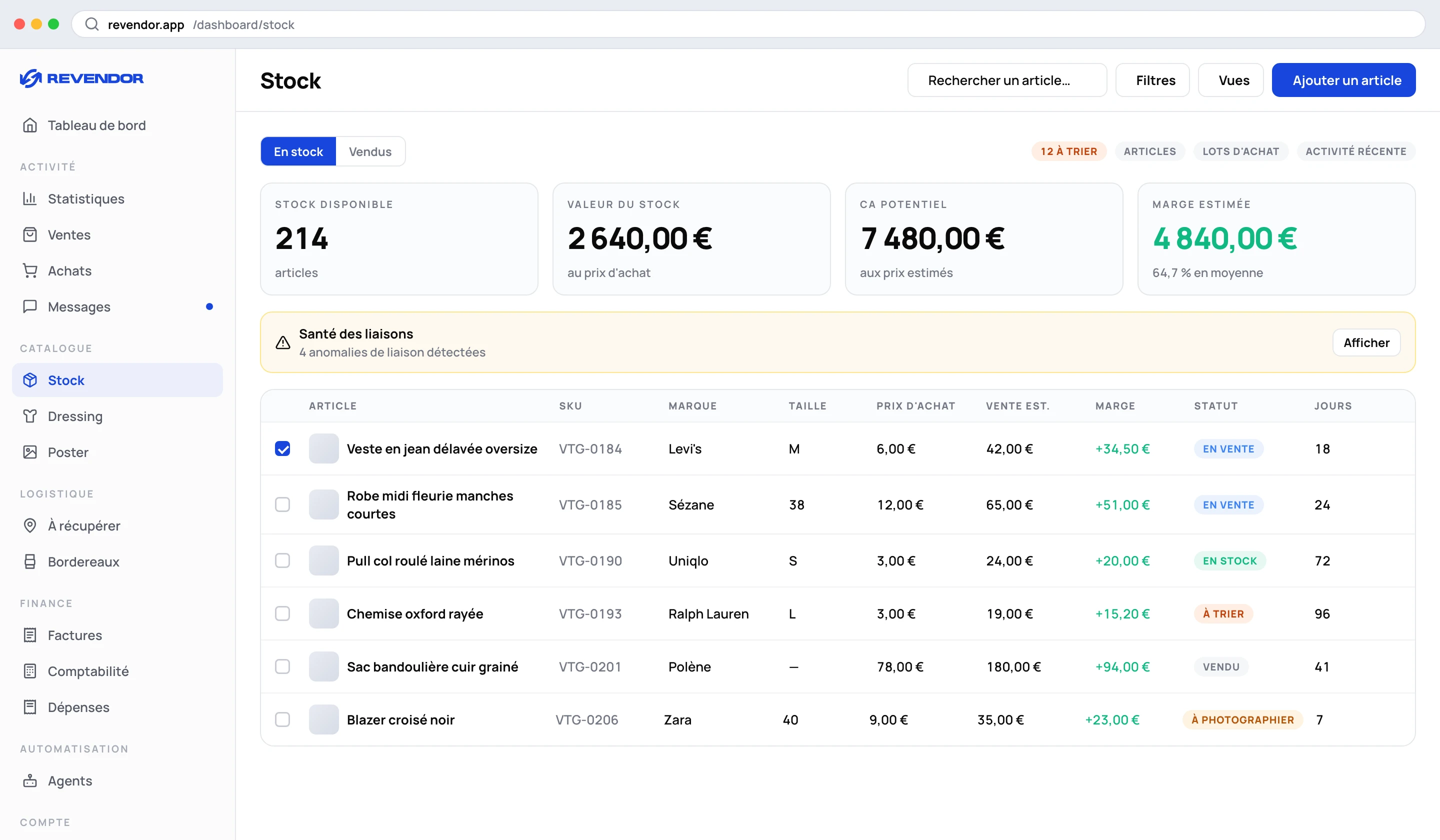
Without stock you have sales; with it, you have margins. Revendor links each sale to the item and its purchase price, and shows what you really earn, how long items take to sell and when a purchase bundle has paid for itself.
Benefits
Real margin per sale
Purchase price, selling price, margin in amount and percentage, estimated or real.
Time is a figure too
Days in stock and days online, side by side: an item bought long ago but listed yesterday is not a slow seller.
Bundles judged honestly
Each purchase bundle shows whether it has broken even, or how much is left to go.
How it works
- 1
Add your items
One by one with every field, in bulk for a bundle (the unit cost is split automatically), or by importing your purchases.
- 2
Organise
Storage locations with colours, SKUs with prefix and automatic numbering, statuses including your own.
- 3
Sell and link
Each sale is linked to its item; a link-health panel flags sales with no item, items sold with no sale and purchases never imported.
- 4
Read your figures
Stock value, potential revenue, estimated margin, total real margin, average time to sell and top brand.
Beyond stock
- Profitability — a monthly table of net profit, ROI and net margin once contributions and tax are deducted, according to your regime (French regimes). An estimate, not a tax return.
- Invoices — PDF invoices for sales and purchases, downloaded individually or as a ZIP.
- Accounting — month-by-month flows (sales, purchases, refunds, Boosts…), manual expenses, CSV export.
- Shipping labels — fetched automatically and cropped to 100×150 mm for thermal printers, with the SKU on the label.
Which plan?
Stock, statistics and invoices are included from Growth. See the pricing page.
Frequently asked questions
How is the margin calculated?
From the seller payout of the sale — Vinted charges private sellers no selling fee, and the Buyer Protection fee paid by the buyer is excluded — minus the item’s purchase price.
I bought a bundle of 30 items. How do I enter it?
Use bulk add: enter the total cost and the quantity, and the unit cost is calculated. The Purchase bundles tab then tracks the bundle until break-even.
Can I export my data?
Yes: CSV export of accounting flows, and PDF invoices for sales and purchases.
Do I need stock to use Revendor?
No. Relisting and the agents work without it. Stock is what gives you real margins and the floor price used for negotiation.
Spend less time on repetitive tasks
Relisting, buyer messages, offers and margins in one app, in six languages.
7-day free trial on Growth and Elite. Cancel anytime.
Revendor is neither affiliated with nor endorsed by Vinted. Vinted is a trademark of Vinted UAB.