
Automatic relist
Automatic relisting for your Vinted listings
On Vinted, a listing is mostly seen while it is fresh. Revendor relists your items for you — after a sale, every few days, or with a scheduled price drop — and only deletes the old listing once the new one is confirmed as published.
Benefits
Back at the top of search
A relisted item becomes a new listing again, visible in the default search feeds.
Nothing is lost on the way
The new listing is created as a draft, published, checked — only then is the old one removed.
A pace that looks human
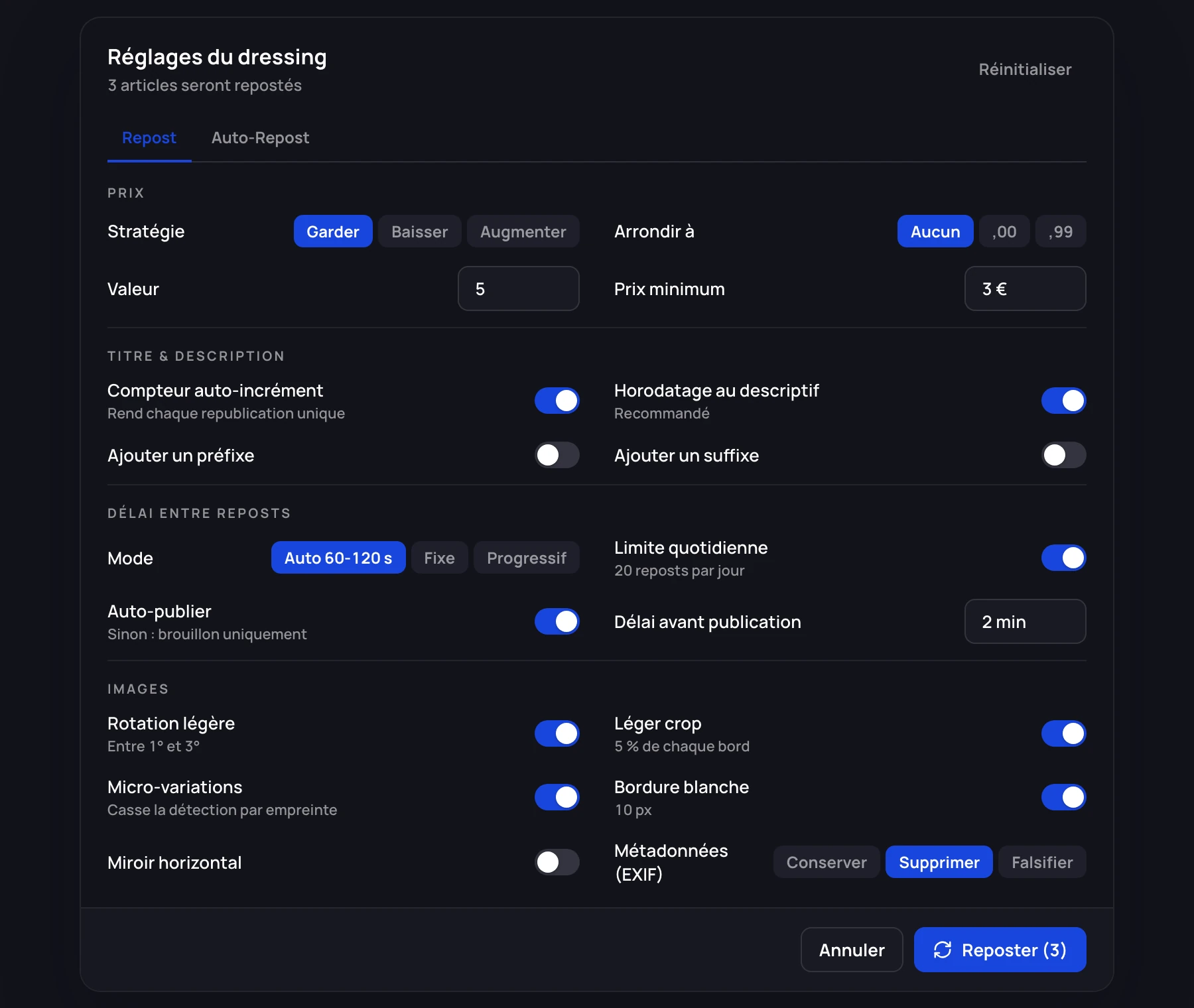
Irregular delays of 60 to 120 seconds by default, an optional daily limit, and a draft-only mode.
How a relist works
- 1
Revendor reads the original listing
Brand, category, size, condition, colours, measurements, shipping, parcel size: every attribute is copied.
- 2
Your rules are applied
Keep, lower or raise the price (with a minimum price and rounding), change the title with a prefix, a suffix or a counter.
- 3
The photos are transformed
Slight rotation, a crop of a few percent, micro-variations, a border, metadata removed: invisible to the eye, enough to change the photo fingerprint.
- 4
Publish, check, delete
The listing is created as a draft, published after a delay, and the old one is deleted only once the new one is online.
Three automatic modes
Auto-repost only acts on the items you mark. Each marked item can combine three options:
- Repost when sold — recreates the listing when the item goes, for sellers with several identical pieces (Elite plan).
- Scheduled repost — every N days (3 by default).
- Scheduled price drop — every N days (7 by default), for example −5% with a €3 floor.
What you should know
- The automation runs in your browser: Chrome must be open with a Vinted tab. Your Vinted credentials are never handed to Revendor’s servers.
- The agent passes every 15 minutes and respects your delays and daily limit; reposts over the limit move to the next day.
- Monthly repost quotas: 1,000 on Starter, 5,000 on Growth, unlimited on Elite. They are ceilings, not targets.
- The Draft only mode creates the listing without publishing it, for you to publish by hand: slower, and the most cautious.
Frequently asked questions
What is the difference between reposting and bumping?
A Boost is a paid Vinted feature that promotes a listing for 3 or 7 days or until it sells. A repost deletes the listing and creates a fresh one with the same item, at no cost on Vinted.
How many items should I relist per day?
Start small and build up gradually. Use the daily limit and keep the Auto delay mode, which spaces reposts irregularly. Scheduled reposts every 5 to 7 days are a reasonable start.
Why transform the photos?
Republishing exactly the same images risks removal for duplication. The transformations change the photo fingerprint without visible difference. Keep them on.
Does it work when my computer is off?
No. The agents run in your browser, so Chrome must be open with a Vinted tab. Sellers who want continuous relisting leave a machine on.
Which plan includes automatic relisting?
Every plan includes reposting, from Starter. Repost after a sale is part of Elite. See pricing.
Spend less time on repetitive tasks
Relisting, buyer messages, offers and margins in one app, in six languages.
7-day free trial on Growth and Elite. Cancel anytime.
Revendor is neither affiliated with nor endorsed by Vinted. Vinted is a trademark of Vinted UAB.